
OnlyFans Free Trial Offers: What Ends and What Charges
OnlyFans does not operate a true free trial button. The platform has no built-in discovery feed or directory, which is why ranking sites such as BestOnlyFans exist to help users compare pages. What people call a “free trial” is usually one of three different things, and each behaves differently once the offer period ends. This article explains what actually stops, what actually charges, and how to avoid paying for something you meant to cancel.

Creators can set a subscription price anywhere from $4.99 to $49.99. A free page is simply a price set to $0, with earnings coming from pay-per-view messages and tips instead. A promotional first month may dip below the $4.99 minimum, but there is no base price under $4.99. That distinction matters, because promotional pricing always has an end date attached to it.
Three offers that all look free
The first model is a discounted first month. The creator sets the normal price, then applies a promotion so the first billing cycle costs less, sometimes well under $4.99. The second model is a permanently free page, where the subscription price is $0 and stays there. The third model is a short trial window, which is rare on the platform and usually handled by the creator outside the standard subscription system.
All three produce the same immediate result: you get access without paying the full rate. The difference appears later. A discounted first month returns to the normal price automatically. A permanently free page never charges a subscription at all. A trial window ends and either converts to paid access or expires completely, depending on how it was arranged.
| Offer type | What you pay now | What happens at renewal |
|---|---|---|
| Discounted first month | Promotional rate, may dip below $4.99 | Standard price of $4.99 to $49.99, auto-renew restarts at full rate |
| Permanently free page | $0 | No subscription charge, pay-per-view and tips still apply |
| Trial window | $0 during the window | Access ends or converts to paid, depending on the arrangement |

What a trial actually unlocks
During a trial window, you see the same timeline a paying subscriber sees. Posts, images and messages appear normally, which creates the impression of full membership. What usually does not carry over is anything tied to payment history, such as access to older locked posts or purchased media.
Most trial arrangements carry limits that are not obvious at signup. The list below covers the ones that come up most often.
- Access applies only to content published during the trial window
- Locked posts still require a separate pay-per-view payment
- Direct messages may be limited or read-only
- Archived media from earlier months stays closed
- The window cannot be extended or restarted on the same account
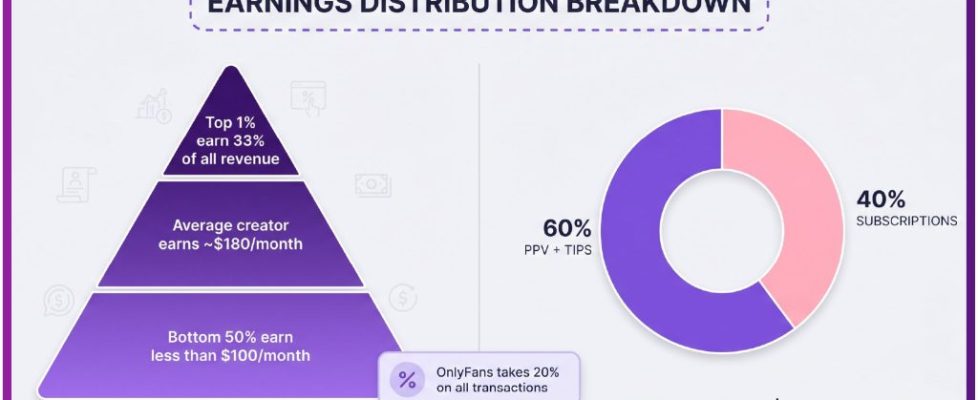
These limits exist because the creator still pays the platform fee on everything. OnlyFans takes 20% of subscriptions, tips and pay-per-view, and the creator keeps 80%. A trial that unlocked everything for free would cost the creator money rather than earn it.
Tip: before accepting any trial, note the exact end date and time in your own calendar. Platform reminders can be delayed, and a reminder that arrives on the end date is already too late to act on.

The renewal moment
On the end date, the system checks whether auto-renew is active. If it is, the subscription moves into a new paid period at the creator’s current listed price. That price may not be the promotional rate you originally paid. The promotional rate applies to the first cycle only.
A second factor affects the amount as well. When a creator raises the subscription price, auto-renew stops automatically. Your existing access lasts until the current paid period ends, and nothing further is charged unless you resubscribe at the new price. This protects subscribers from silent increases, but it also means a page you assumed was renewing may simply lapse.
Typical paid pages sit between $4.99 and $15, and the average lands somewhere in the $5 to $10 range. That is the amount to expect month by month once any promotion has passed.
- Month one: promotional rate, sometimes below $4.99
- Month two onward: standard rate of $4.99 to $49.99
- Pay-per-view messages: charged individually as unlocked
- Tips: charged individually, no minimum
- Platform fee: 20% deducted from the creator’s side, not added to your bill

Turning off auto-renew in time
Auto-renew can be switched off at any point during the paid period, and access continues until that period ends. There is no penalty and no partial refund. The important variable is timing: the change must be saved before the renewal date processes, not on it.
Work through the steps below in order. Skipping a step is the most common reason people believe they cancelled when they did not.
- Open the subscription list in your account settings
- Find the specific creator, not the general billing page
- Select the auto-renew toggle and turn it off
- Confirm the change in the dialog that appears
- Check that the subscription now shows an end date rather than a renewal date

When a free page is not a trial
A permanently free page has no end date and no renewal event. The subscription price is set to $0 and stays there. Nothing charges automatically, and nothing expires. This is a genuinely different arrangement from a trial, even though both start at zero cost.
The cost on a free page comes from interaction rather than access. Pay-per-view messages and tips are the creator’s income, and those are optional purchases. You can follow a free page indefinitely without spending anything, provided you do not unlock paid media.
| Feature | Trial or promo | Permanently free page |
|---|---|---|
| End date | Yes, defined at signup | None |
| Subscription charge | Applies after the promo period | Never |
| Pay-per-view messages | Usually present | Usually present |
| Auto-renew risk | High if not switched off | Not applicable |
Ranking sites including BestOnlyFans group free pages separately from discounted ones for this reason. Mixing them together leads users to expect an expiry that never comes, or a free ride that ends after thirty days.

Cancelling without losing access
Cancelling auto-renew is not the same as losing access immediately. If you have paid for the current period, that period runs to its end date and everything inside it stays visible. The difference appears only after the end date passes.
What disappears at that point is predictable. The list below covers the standard changes.
- The subscription badge is removed from your account
- New posts stop appearing in your feed
- Direct messaging to the creator closes
- Previously unlocked pay-per-view media remains in your purchases
- Saved posts may become inaccessible
If you want continued access at the lowest cost, the practical move is to resubscribe during a future promotion rather than letting a full-price renewal run. Creators frequently run first-month discounts for returning subscribers as well as new ones, though this varies by page.
Choosing between a trial and a free page
Short-term curiosity suits a promotional first month. You see the full timeline for a reduced rate, then decide whether the standard price is worth it. Ongoing following suits a permanently free page, where you can stay subscribed for years without a subscription charge and pay only for what you choose to unlock.
Whichever you pick, the mistakes are the same in both cases. Avoiding them is mostly about reading the page before you subscribe.
- Assuming a promotional rate carries into the second month
- Treating a free page as though it expires
- Cancelling on the renewal date rather than before it
- Expecting a refund for a period already started
- Overlooking that price increases stop auto-renew automatically
- Confusing unlocked purchases with subscription access
A useful reference point is that paid subscriptions average between $5 and $10, with the range running from $4.99 up to $49.99. Checking a page’s listing on a ranking site before subscribing tells you which model you are dealing with. For free and low-cost pages specifically, this comparison of onlyfans free milf pages shows how the free model is listed in practice. BestOnlyFans and similar directories exist because the platform itself offers no search or discovery tool, so the listing is often the only advance signal of what a page will cost after any promotion ends.
Finally, keep two-step authentication active on your account regardless of which offer you choose. Payment settings and subscription lists are the first places an unauthorised login will look, and a trial that quietly converts to a paid renewal is far easier to catch when you receive a login alert you did not trigger.
FAQ
Does OnlyFans offer an official free trial?
No. The platform has no built-in trial feature. What looks like a trial is a discounted first month, a permanently free page, or an arrangement handled by the creator outside the standard subscription system.
Will I be charged automatically after a promotional first month?
Yes, if auto-renew is still active. The promotional rate applies to the first cycle only, and the next charge is the creator’s standard price, anywhere from $4.99 to $49.99.
Can I cancel and still keep access for the rest of the month?
Yes. Switching off auto-renew does not end the current paid period. Access continues until the end date, and the subscription simply stops renewing afterwards.
Do free pages ever start charging a subscription?
A page set to $0 does not charge a subscription. If the creator later sets a price, auto-renew does not apply to existing free followers, so nothing is charged without a new subscription.